

Photo Frames with Your Camera's Story

为照片加上属于相机的边框

Shot Scene adds clean frames, watermarks, and shooting info to your photos. Camera, lens, settings, and location are read from EXIF automatically — add a brand logo, fine-tune the text, and apply one style across a whole set.

Shot Scene 为照片加上简洁边框、水印和拍摄信息。 相机、镜头、参数与地点会自动从 EXIF 中读取 —— 还能加上 品牌 logo、微调文字,并把同一种风格一次套用到整组照片。

Paid app on Microsoft Store · Free trial available · Windows 10 & 11 微软商店付费应用 · 提供免费试用 · 支持 Windows 10 与 11

Auto EXIF
Camera, lens & settings
相机、镜头与参数
Brand Logos
Leica · Fujifilm · iPhone & more
徕卡 · 富士 · iPhone 等
Batch Style
One look for the whole set
整组照片统一风格

Features 功能一览

Shot Scene frame editor adding a clean border and EXIF caption to a photo
Clean frames 简洁边框

A tidy frame with the shot's details

附带拍摄信息的整洁边框

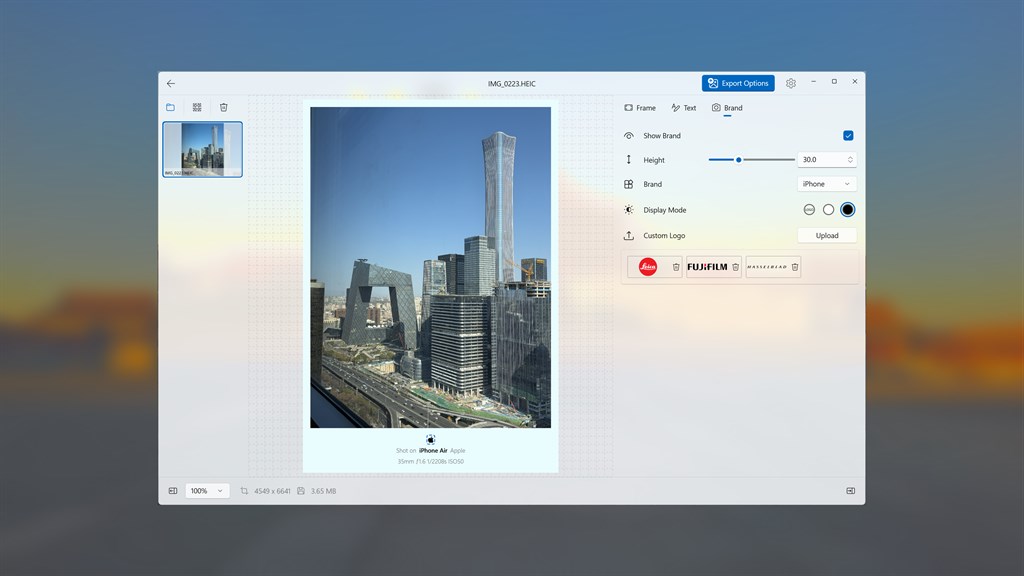
Wrap your photo in a clean white frame and let the caption show how it was taken — "Shot on iPhone Air · 35mm f/1.6 1/220s ISO50". Adjust each border, content padding, and the background color until it feels just right.

为照片套上简洁的白色边框,并在下方标注拍摄信息 ——「Shot on iPhone Air · 35mm f/1.6 1/220s ISO50」。上下左右边框、内容留白与背景颜色都可逐项调整,直到满意为止。
Brand panel with built-in Leica, Fujifilm, Hasselblad and iPhone logos and a custom logo upload
Brand it 加上品牌

Camera brand logos, or your own

相机品牌 logo,也可用你自己的

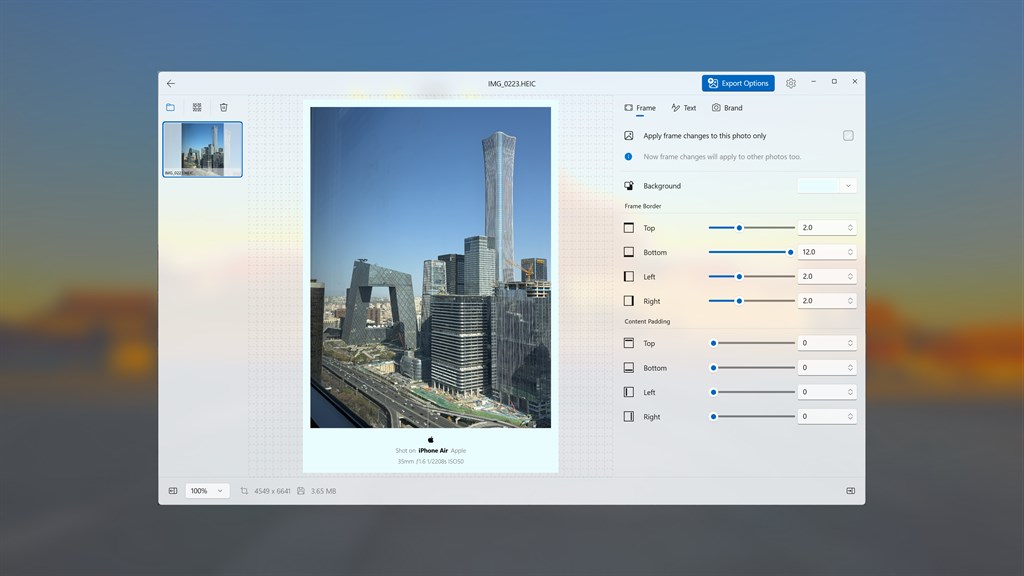
Drop in a brand mark to finish the frame — Leica, Fujifilm, Hasselblad, iPhone and more are built in, with colored, light, or dark display modes. Prefer your own mark? Upload a custom logo and set its height.

为边框点上品牌标志 —— 内置徕卡、富士、哈苏、iPhone 等,可选彩色、浅色或深色显示模式。想用自己的标志?上传自定义 logo 并设置高度即可。

Text panel showing editable caption lines with per-line visibility and font controls
Make it yours 随心定制

Edit the text, then style a whole set

编辑文字,再统一整组风格

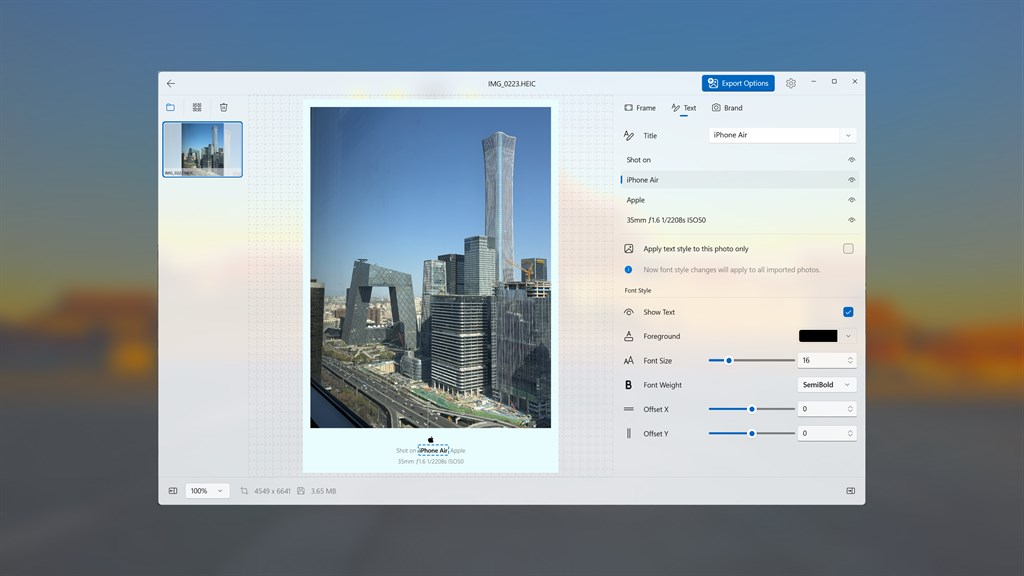
Show or hide each caption line, edit the wording, and tune font size, weight, color, and position. Apply your style to just this photo — or to all imported photos at once, so an entire album shares the same look.

每一行文字都能单独显示 / 隐藏、修改内容,并调整字号、字重、颜色和位置。可只应用到当前照片,也可一次性套用到所有导入的照片,让整本相册风格统一。

Three Steps to a Finished Photo 三步搞定一张成片

Import your photos

导入照片

Open Shot Scene and add one or more photos. EXIF info like camera, lens, and settings is read automatically.

打开 Shot Scene,导入一张或多张照片,相机、镜头、参数等 EXIF 信息会自动读取。

Frame, brand & text

边框、品牌与文字

Adjust the frame, pick a brand logo, and fine-tune the caption text and style to taste.

调整边框、选择品牌 logo,并按喜好微调说明文字与样式。

Export & share

导出并分享

Use Export Options to save full-quality images, ready to keep or share.

通过导出选项保存高质量成片,随时收藏或分享。

Use Cases 典型使用场景

✈️ Travel albums

✈️ 旅行相册

Frame trip photos with the location and camera details so each shot tells where and how it was taken.

为旅行照片加上地点与相机信息,每张照片都记录下「在哪、怎么拍的」。

📷 Camera-style frames

📷 相机风格边框

Give phone or mirrorless shots that clean "shot on" look with a brand logo and EXIF caption.

为手机或微单照片打造简洁的「shot on」风格,配上品牌 logo 与 EXIF 信息。

📱 Social sharing

📱 社交分享

Prepare polished, consistent images for your feed without opening a heavyweight editor.

无需打开笨重的修图软件,就能为朋友圈 / 社交平台准备风格统一的精致图片。

🗂️ Consistent sets

🗂️ 成套统一

Apply one style to every imported photo so a whole batch shares the same frame and text.

把同一种风格套用到所有导入的照片,让整批图片共享相同的边框与文字。

🏷️ Personal watermark

🏷️ 个人水印

Upload your own logo as a custom mark to brand your photos before publishing.

上传自己的 logo 作为自定义水印,发布前为照片打上个人标记。

🖼️ Print & keepsakes

🖼️ 打印与留念

Export high-resolution framed photos that look great printed or saved as keepsakes.

导出高分辨率的带框照片,打印或作为纪念收藏都很好看。

System Requirements & Specs 系统要求与规格

Platform
运行平台
Windows 10 (1809+), Windows 11
Photo formats
照片格式
Common image formats including HEIC and high-resolution photos
常见图片格式,包含 HEIC 及高分辨率照片
EXIF info
EXIF 信息
Camera model, lens, focal length, aperture, shutter, ISO, and location read automatically
自动读取相机型号、镜头、焦距、光圈、快门、ISO 与拍摄地点
Frame controls
边框控制
Per-side borders, content padding, background color
四边独立边框、内容留白、背景颜色
Branding
品牌标志
Built-in logos (Leica, Fujifilm, Hasselblad, iPhone…), custom logo upload, light/dark/colored modes
内置 logo(徕卡、富士、哈苏、iPhone 等)、自定义 logo 上传、浅 / 深 / 彩色模式
Text
文字
Per-line visibility, editable content, font size, weight, color, and offset
逐行显隐、内容可编辑、字号、字重、颜色与偏移
Batch
批量
Apply a style to one photo or to all imported photos
可应用到单张照片,或所有导入的照片
Price
价格
Paid app on Microsoft Store · free trial available · price set by Store and varies by region
微软商店付费应用,提供免费试用;价格由商店按地区设置,以商店实际显示为准

Frequently Asked Questions 常见问题

What is Shot Scene? 这是一款什么应用?

It's a Windows 10 / 11 app that adds clean frames, watermarks, and shooting information to your photos. It reads camera, lens, and location details from EXIF so you can create polished, camera-style frames in seconds.

这是一款 Windows 10 / 11 应用,为照片添加简洁边框、水印和拍摄信息。它会从 EXIF 读取相机、镜头与地点等细节,让你几秒钟就能做出精致的相机风格边框。

Where does the camera and lens info come from? 相机和镜头信息从哪来?

It's read automatically from the photo's built-in EXIF metadata — camera model, lens, focal length, aperture, shutter speed, ISO, and location. You can then edit, hide, or restyle any line.

这些信息会自动从照片自带的 EXIF 元数据中读取 —— 相机型号、镜头、焦距、光圈、快门、ISO 与地点,之后你可以编辑、隐藏或重新设置任意一行的样式。

Can I add a camera brand logo? 可以加相机品牌 logo 吗?

Yes. Brand logos such as Leica, Fujifilm, Hasselblad, and iPhone are built in, with light, dark, and colored display modes. You can also upload your own custom logo.

可以。内置徕卡、富士、哈苏、iPhone 等品牌 logo,提供浅色、深色和彩色显示模式,也支持上传你自己的自定义 logo。

Can I apply the same style to many photos at once? 能一次给多张照片套同一种风格吗?

Yes. Apply a frame or text style to just the current photo, or to all imported photos at once — an easy way to give a whole set a consistent look.

可以。边框或文字样式既能只应用到当前照片,也能一次套用到所有导入的照片,轻松让整组照片风格统一。

Does it support HEIC and high-resolution photos? 支持 HEIC 和高分辨率照片吗?

Yes. Shot Scene works with common formats including HEIC and handles high-resolution images, so you can export full-quality results.

支持。Shot Scene 兼容包括 HEIC 在内的常见格式,并能处理高分辨率图片,可导出高质量成片。

How much does it cost? 这款应用收费吗?

It's a paid app on the Microsoft Store with a free trial so you can try it before buying. Final pricing is set by Microsoft Store and varies by country / region — please refer to the Store page for the current price in yours.

这是一款微软商店付费应用,提供免费试用,可先试再买。最终售价由微软商店按国家 / 地区定价,以商店页面显示为准。

Get it from Microsoft Store 在微软商店获取

Available on Windows 10 and Windows 11. Free trial available before purchase. 支持 Windows 10 与 Windows 11;购买前可先免费试用。